How Do Users and Schemas Differ, and Who Owns This Table?
If we can query the ORDERS table, does that mean the account we are using owns it? In this article, we will use one account to read a table in another schema and see the difference between a user and a schema owner in practice.
If we can query the ORDERS table, does that mean the account we are using owns it? In this article, we will use one account to read a table in another schema and see the difference between a user and a schema owner in practice.
The difference between a user and a schema:
- User (User Account): An identity or account used to authenticate to the database. Privileges are assigned to this identity.
- Schema: A collection of database objects, such as tables, views, and indexes, owned by a particular user. In Oracle, a schema always has the same name as its owning user.
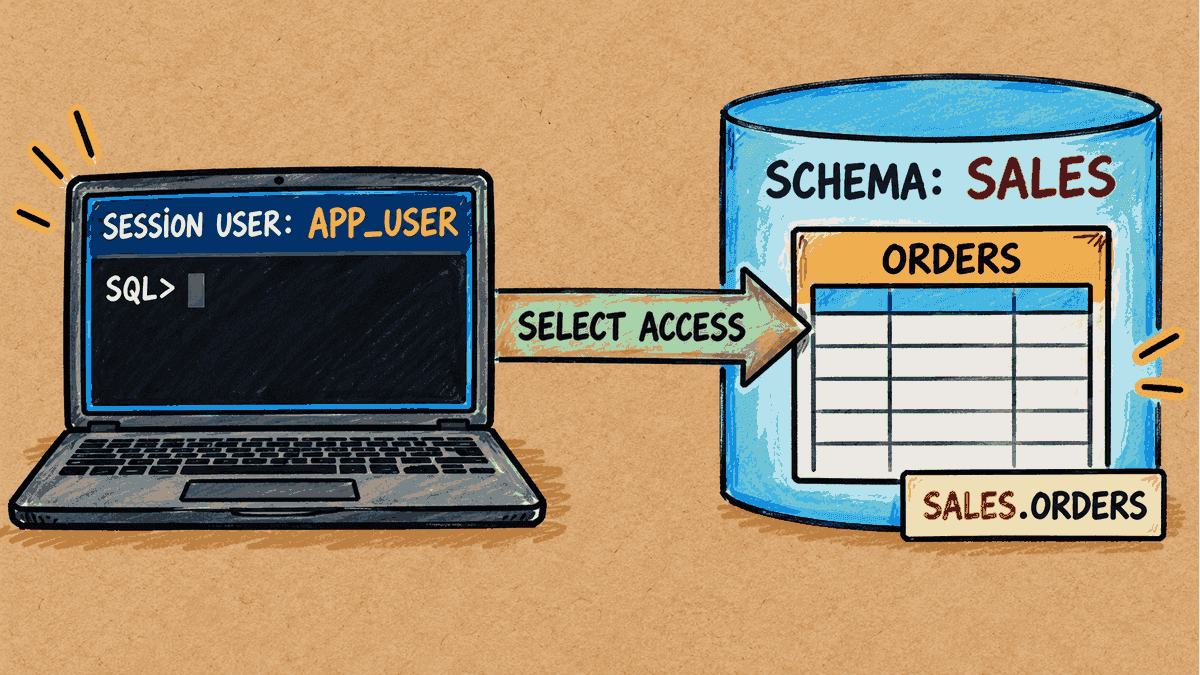
Concept illustration: The illustration uses APP_USER and SALES for readability. The lab below uses KB_MKT_LAB_20261014_R2 and KB_MKT_OWNER_20261014_R2. Changing the current schema does not grant additional privileges.
Step 1: Check the Session User and Current Schema
Use SYS_CONTEXT to check the user identity and default schema for the current session:
SELECT SYS_CONTEXT('USERENV', 'SESSION_USER') AS session_user,
       SYS_CONTEXT('USERENV', 'CURRENT_SCHEMA') AS current_schema
FROM dual;
SESSION_USER             CURRENT_SCHEMA
------------------------ ------------------------
KB_MKT_LAB_20261014_R2   KB_MKT_LAB_20261014_R2

1 row selected.
Interpreting the results:
When the connection is first established, SESSION_USER (the account used to log in) and CURRENT_SCHEMA (the default schema for resolving object names) have the same value: KB_MKT_LAB_20261014_R2.
Step 2: Find Out Who Owns the ORDERS Table
For this lab, an ORDERS table has been prepared in the KB_MKT_OWNER_20261014_R2 schema, and the lab account has already been granted SELECT on it. We can check the table owner through ALL_TABLES as follows:
SELECT owner, table_name
FROM all_tables
WHERE table_name = 'ORDERS'
ORDER BY owner;
OWNER                     TABLE_NAME
------------------------- --------------------
KB_MKT_OWNER_20261014_R2  ORDERS

1 row selected.
Interpreting the results:
The OWNER column shows KB_MKT_OWNER_20261014_R2, which is different from our SESSION_USER.
(Note: ALL_TABLES shows only tables that the current account has permission to access. If the query returns no rows, the table may not exist, or our account may not yet have been granted permission to read it.)
Step 3: Explicitly Prefix the Table Name with Its Schema Owner
To read data from a table in another schema, we can explicitly prefix the table name with the schema name (schema_name.table_name):
SELECT order_id
FROM KB_MKT_OWNER_20261014_R2.ORDERS
WHERE ROWNUM <= 5;
    ORDER_ID
------------
         101

1 row selected.
Result: The statement succeeds and returns ORDER_ID = 101. Adding the schema prefix lets Oracle locate the intended object precisely, without relying on the default schema for name resolution.
Step 4: Change Where Object Names Are Resolved with ALTER SESSION
If we do not want to type the schema prefix every time, we can change the session's default schema for resolving object names with ALTER SESSION SET CURRENT_SCHEMA:
ALTER SESSION SET CURRENT_SCHEMA = KB_MKT_OWNER_20261014_R2;

SELECT SYS_CONTEXT('USERENV', 'SESSION_USER') AS session_user,
       SYS_CONTEXT('USERENV', 'CURRENT_SCHEMA') AS current_schema
FROM dual;
Session altered.

SESSION_USER             CURRENT_SCHEMA
------------------------ ------------------------
KB_MKT_LAB_20261014_R2   KB_MKT_OWNER_20261014_R2

1 row selected.
Once CURRENT_SCHEMA is set to KB_MKT_OWNER_20261014_R2, we can refer to ORDERS directly, without typing the schema prefix:
SELECT order_id FROM ORDERS;
    ORDER_ID
------------
         101

1 row selected.
Key Points About Users and Schemas
ALTER SESSION SET CURRENT_SCHEMAdoes not switch users: This statement changes only the name resolution path.SESSION_USERremains the same.- Data access privileges remain unchanged: Changing
CURRENT_SCHEMAdoes not grant any additional privileges. A statement succeeds only ifSESSION_USERhas already been granted the privileges needed to read or modify the table. - Troubleshooting when a query cannot find an object:
- Check which account is currently logged in (
SESSION_USER). - Check who owns the table (
OWNER). - Check whether our account has already been granted the necessary privileges on that table (
GRANT).
- Check which account is currently logged in (
Read more Oracle topics in the Oracle articles on teeDBA.com.
Related articles
Tablespace and Datafile: What Should You Check When Space Is Running Low?
When the system warns that a tablespace is nearly full, do we need to add a datafile or increase the file size immediately? Before deciding to add space, let's read the actual values in the system and distinguish what each number represents: actual usage, the current file size, or the maximum size the system allows it to reach.

Can't Connect to Oracle: What Should You Check for Host, Port, and Service Name?
Why can't you connect to Oracle Database even though you're using the same connection details that worked before? What information should you send to your DBA for help? This article explains the roles of Host, Port, and Service Name, then uses SQL commands from a working session to confirm the services on the database side.
How Do an Oracle Database and an Instance Differ? See the Difference in One Diagram
Separate an Oracle Database's files from an Instance's memory and processes, then compare their status using v$instance and v$database.