What Is a Bind Variable, and Why Should Values Be Kept Separate from SQL Text?
If two SQL statements differ only in the number used in a condition, will Oracle treat them as separate statements? We’ll run SQL with a bind variable and examine the evidence in the cursor stored by the database.
If two SQL statements differ only in the number used in a condition, will Oracle treat them as separate statements? We’ll run SQL with a bind variable and examine the evidence in the cursor stored by the database.
A bind variable is a placeholder whose value is supplied separately from the SQL text. When a data value changes, it does not need to be concatenated directly into the SQL statement. We’ll create a small test table and check the results as we go.
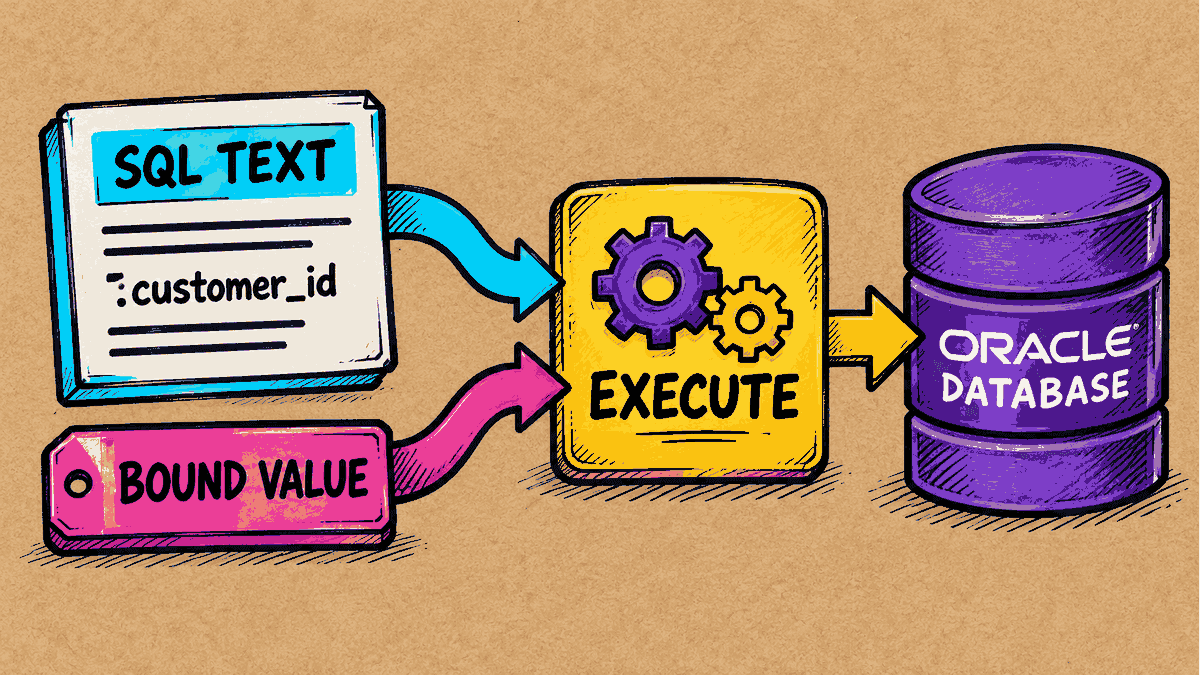
Concept illustration: separating SQL text from the value supplied to a bind variable
Step 1: Prepare the Test Data
Run these statements once in a test schema:
CREATE TABLE kb_bind_orders (
    order_id NUMBER PRIMARY KEY,
    customer_id NUMBER NOT NULL
);

INSERT INTO kb_bind_orders VALUES (101, 120);
INSERT INTO kb_bind_orders VALUES (102, 121);
COMMIT;
In this sample data, order 101 belongs to customer 120, and order 102 belongs to customer 121. Next, we’ll change the search condition while keeping the same SELECT text.
Step 2: Run the Statement with a Bind Variable
This example uses the SQL*Plus commands VARIABLE and EXEC to set the bind value. In an application, you would use the driver’s bind API, such as JDBC/ODBC, instead. The comment in the SELECT identifies the statement so that it is easier to find in V$SQL.
VARIABLE customer_id NUMBER

-- Set the bind value to 120 and run the statement for the first time
EXEC :customer_id := 120
SELECT /* KBMKT_BIND_20261014 */ order_id, customer_id
FROM kb_bind_orders
WHERE customer_id = :customer_id;
PL/SQL procedure successfully completed.

    ORDER_ID  CUSTOMER_ID
------------ ------------
         101          120

1 row selected.
The first execution returns the row 101, 120. Now change the bind value to 121 and run the SELECT again with exactly the same text:
-- Change the bind value to 121 and run the statement for the second time
EXEC :customer_id := 121
SELECT /* KBMKT_BIND_20261014 */ order_id, customer_id
FROM kb_bind_orders
WHERE customer_id = :customer_id;
PL/SQL procedure successfully completed.

    ORDER_ID  CUSTOMER_ID
------------ ------------
         102          121

1 row selected.
This time, the result is 102, 121, while the SELECT text sent to the database remains exactly the same.
Step 3: Check the Evidence of Cursor Reuse in the Shared Pool
We can examine what Oracle is doing behind the scenes by querying V$SQL. Note that ordinary user accounts may need permission from the DBA to read this view.
SELECT sql_id, child_number, executions
FROM v\$sql
WHERE sql_text LIKE 'SELECT /* KBMKT_BIND_20261014 */%';
SQL_ID        CHILD_NUMBER   EXECUTIONS
------------- ------------ ------------
2haczp9uf2020            0            2

1 row selected.
Interpreting the result:
For this SQL_ID, we find CHILD_NUMBER 0 with an EXECUTIONS count of 2. This confirms that the SQL statement was executed twice through the same cursor in the shared pool.
Why does this matter? Before executing a SQL statement, Oracle must parse it to check its syntax, object names and access privileges (semantics), and work out an execution plan.
- Hard parse: If the statement is new and has not been encountered before, the database must do all this work from scratch, consuming substantial CPU and shared pool resources.
- Soft parse: With a bind variable, the SQL text stays exactly the same. Oracle can find the existing cursor in the shared pool and reuse its execution plan immediately, greatly reducing the system’s workload.
Step 4: Use Bind Variables Correctly and Safely
- Reduce the risk of SQL injection: Using the bind API correctly ensures that the database treats supplied values as data. Any special characters within those values will not be interpreted or executed as code.
- Understand the limitations: Bind variables can replace only data values (literals) in conditions. They cannot replace table names or column names. If an application needs to let users choose object names dynamically, those names must always be checked against a whitelist first.
My suggestion: Start by reviewing SQL that runs frequently in your system. Keep data values clearly separate from SQL text to reduce hard parsing and help the system respond as efficiently as possible.
Read more Oracle topics in the Oracle articles on teeDBA.com.
Related articles
Slow SQL: Where Should You Start? 5 Questions Before Adding an Index
Before adding an index, identify the SQL, input values, timing interval and recent changes, then compare both time and row-level results after a change.
The Column Contains Text, but the Condition Uses a Number: How Does Oracle Compare Them?
If a table column is designed to store text (VARCHAR2), but the SQL WHERE condition supplies a number (NUMBER) for comparison, what happens to a statement that ran successfully on day one when a value such as 'ABC' is added to the table? We'll test this and look at the actual results before and after adding the new data.
If the App Already Validates Data, Do We Still Need Database Constraints?
The web form or application already validates data. But if a script, batch job, or another program writes to the same table, do those business rules still apply across every entry point? In this article, we'll add constraints to a table and run statements to see both what succeeds and what the database refuses to save.